DropCam Wireless IP Camera
Setup
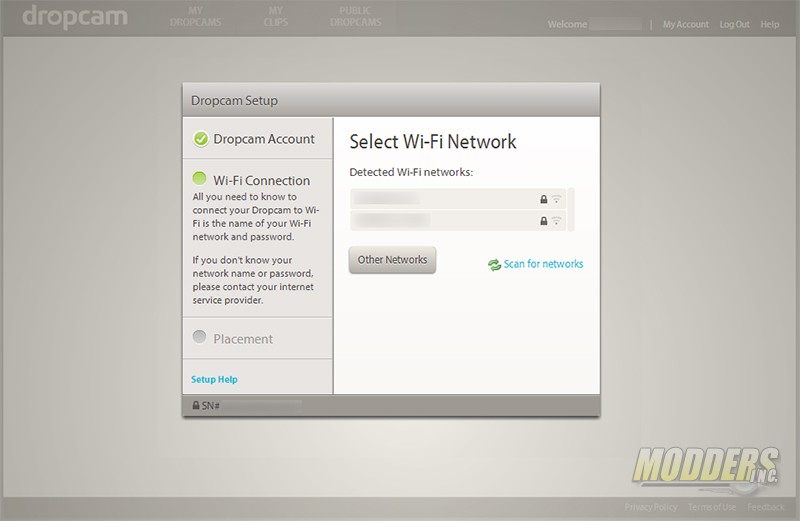 |
Setup of the Dropcam wireless IP camera is incredibly easy. Use the supplied USB cable and plug one end into the camera and the other into your computer. After your computer installs the necessary drivers the camera will show up as a USB flash drive. Depending on your operating system launch the installer. There are only three steps required to get the Dropcam wireless IP camera operational. Once you launch the installer you will be prompted to set up an account with Dropcam. Fill out the form and submit it. The next step is to connect the camera to the wireless network. When you are prompted unplug the USB cable from the computer and place your camera where you want it. Plug the USB cable into the supplied power adapter. Head to the Dropcam website to view the camera.





Well, I have the DropCam and am thinking of getting the DropCam Pro – Its have better everything and its about $50.00 more. I would like to see someone make a mod that allows the user to use there own Hard Drive and store the video it sees, I dont want to pay a monthly fee to DropCam.
I second that. The bandwidth-eating upload/download transfers are too much, I read someone calculating around 60GB per dropcam monthly upload. That’s not even on dropcam pro! If there’s a hack that would allow diverting the camera video signal to a pogoplug device on the same network. There’s a drawback to doing this, if the thief steals the hard drive with the dropcam, then it defeats the purpose of having this system in the first place.
Dropcam is nice, but its business model is flawed. The camera is expensive; and it only works with Dropcam’s cloud service, which is even more expensive; it uses too much bandwidth that will significantly slow down your Internet connection. It requires Internet connection all the time and does not support local storage or local streaming. If you have more than one Dropcams, the cost will be even more expensive and you are likely to hit your ISP’s usage limit.
We’ve been using our Dropcam with one of the outdoor cases from dropcamcases.com to watch our dog in the garden while at work and they work amazingly well! Love that cam!
+1 I was disappointed when I found out that Dropcam didn’t have an outdoor model, but I also found the dropcase enclosures and they work nicely, even in the rain
We want to do be your partner.Our website is http://www.acesee.com . We are chinese manufacturer of security devices like IP cameras,car dash cams,wifi kits and Zigbee smart home devices. We accept paypal for sample order.More informaltion,email:tim@acesee.com.