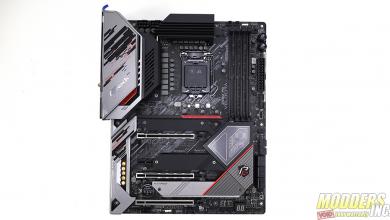
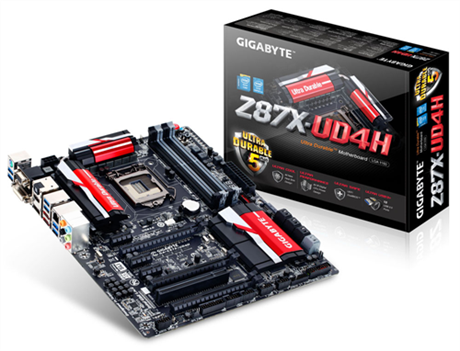
Gigabyte has been a major player in the motherboard market for a while now. And while back in the day, some of their releases may have been a little hit and miss, the releases today seem to just keep coming on strong. Recently Gigabyte had released their GA-Z87X-UD4H motherboard. This board is built around Intel’s Z87 chip for Socket 1150 based processors. The GA-Z87X-UD4H is based on Gigabytes Ultra Durable 5 technology, which through various features and technology helps ensure that this motherboard will stand the test of time and some users and be a viable piece of hardware in the PC for a long time to come.
Support for Intel® Core™ i7 processors/Intel® Core™ i5 processors/Intel® Core™ i3 processors/Intel® Pentium® processors/Intel® Celeron® processors in the LGA1150 package
L3 cache varies with CPU
(Please refer “CPU Support List” for more information.)
Chipset
Intel® Z87 Express Chipset
Memory
4 x 1.5V DDR3 DIMM sockets supporting up to 32 GB of system memory * Due to a Windows 32-bit operating system limitation, when more than 4 GB of physical memory is installed, the actual memory size displayed will be less than the size of the physical memory installed.
Support for Extreme Memory Profile (XMP) memory modules
(Please refer “Memory Support List” for more information.)
Onboard Graphics
Integrated Graphics Processor:
1 x D-Sub port, supporting a maximum resolution of 1920×1200
1 x DVI-D port, supporting a maximum resolution of 1920×1200 * The DVI-D port does not support D-Sub connection by adapter.
1 x HDMI port, supporting a maximum resolution of 4096 x 2160 @ 24 Hz / 2560 x 1600 @ 60 Hz * Support for HDMI 1.4a version.
1 x DisplayPort, supporting a maximum resolution of 4096 x 2160 @ 24 Hz / 2560 x 1600 @ 60 Hz * Support for DisplayPort 1.2 version.
Maximum shared memory of 1 GB
Audio
Realtek® ALC898 codec
High Definition Audio
2/4/5.1/7.1-channel
Support for S/PDIF In/Out
LAN
Intel® GbE LAN chip (10/100/1000 Mbit)
Expansion Slots
1 x PCI Express x16 slot, running at x16 (PCIEX16) * For optimum performance, if only one PCI Express graphics card is to be installed, be sure to install it in the PCIEX16 slot.
1 x PCI Express x16 slot, running at x8 (PCIEX8) (The PCIEX16 and PCIEX8 slots conform to PCI Express 3.0 standard.) * The PCIEX8 slot shares bandwidth with the PCIEX16 slot. When the PCIEX8 slot is populated, the PCIEX16 slot will operate at up to x8 mode.
1 x PCI Express x16 slot, running at x4 (PCIEX4) * The PCIEX4 slot shares bandwidth with the PCIEX1_2/3 slots. The PCIEX1_2/3 slots will become unavailable when a PCIe x4 expansion card is installed. * When installing a x8 or above card in the PCIEX4 slot, make sure to set PCIE Slot Configuration in BIOS Setup to x4. (Refer to Chapter 2, “BIOS Setup,” “Peripherals,” for more information.)
3 x PCI Express x1 slots (The PCIEX4 and PCI Express x1 slots conform to PCI Express 2.0 standard.)
1 x PCI slot
Multi-Graphics Technology
Support for 2-Way AMD CrossFire™/2-Way NVIDIA® SLI™ technology (PCIEX16 and PCIEX8)
Storage Interface
Chipset:
6 x SATA 6Gb/s connectors (SATA3 0~5) supporting up to 6 SATA 6Gb/s devices
Support for RAID 0, RAID 1, RAID 5, and RAID 10
Marvell® 88SE9172 chip:
2 x SATA 6Gb/s connectors (GSATA3 6/7) or 2 eSATA 6Gb/s connectors on the back panel, supporting up to 2 SATA 6Gb/s devices * Use either the GSATA3 6, 7 connectors or the eSATA connectors at a time.
Support for RAID 0 and RAID 1
USB
Chipset:
Up to 2 USB 3.0/2.0 ports (available through the internal USB header)
Up to 6 USB 2.0/1.1 ports (available through the internal USB headers)
Chipset + 2 Renesas® uPD720210 USB 3.0 Hubs:
Up to 8 USB 3.0/2.0 ports (6 ports on the back panel, 2 ports available through the internal USB header)
* Please download & install Win8 USB patch for better compatibility.
CPU/CPU OPT/System fan speed control * Whether the fan speed control function is supported will depend on the cooler you install.
BIOS
2 x 128 Mbit flash
Use of licensed AMI EFI BIOS
Support for DualBIOS™
PnP 1.0a, DMI 2.0, SM BIOS 2.6, ACPI 2.0a
Unique Features
Support for Q-Flash
Support for Xpress Install
Support for APP Center * Available applications in APP Center may differ by motherboard model. Supported functions of each application may also differ depending on motherboard specifications. @BIOS EasyTune EZ Setup ON/OFF Charge2 USB Blocker
We use essential cookies to make our site work. We may also use non-essential cookies to improve user experience and analyze website traffic. By clicking “Accept,” you agree to our website's usage of Cookies.
Functional
Always active
The technical storage or access is strictly necessary for the legitimate purpose of enabling the use of a specific service explicitly requested by the subscriber or user, or for the sole purpose of carrying out the transmission of a communication over an electronic communications network.
Preferences
The technical storage or access is necessary for the legitimate purpose of storing preferences that are not requested by the subscriber or user.
Statistics
The technical storage or access that is used exclusively for statistical purposes.The technical storage or access that is used exclusively for anonymous statistical purposes. Without a subpoena, voluntary compliance on the part of your Internet Service Provider, or additional records from a third party, information stored or retrieved for this purpose alone cannot usually be used to identify you.
Marketing
The technical storage or access is required to create user profiles to send advertising, or to track the user on a website or across several websites for similar marketing purposes.
 Gigabyte has been a major player in the motherboard market for a while now. And while back in the day, some of their releases may have been a little hit and miss, the releases today seem to just keep coming on strong. Recently Gigabyte had released their GA-Z87X-UD4H motherboard. This board is built around Intel’s Z87 chip for Socket 1150 based processors. The GA-Z87X-UD4H is based on Gigabytes Ultra Durable 5 technology, which through various features and technology helps ensure that this motherboard will stand the test of time and some users and be a viable piece of hardware in the PC for a long time to come.